Microsoft Intune 2026 Changes: What IT Leaders Need to Do Now
The Intune updates arriving in 2026 are an architecture decision, not a license tweak.
Microsoft is tightening how Intune-managed apps authenticate, update, and enforce policy. The changes arrive alongside new Intune capabilities built into Microsoft 365 (M365) E3 and E5, which will quickly expose weak endpoint strategies. Even mature teams struggle to keep up with Microsoft’s rapid change cadence, which is why these Intune shifts often catch many organizations by surprise.
For Chief Information Officers (CIOs) or Chief Information Security Officers (CISOs), this is the moment to treat Intune as a strategic control plane for devices, identities, and data, not a background Mobile Device Management (MDM) tool.
What Is Actually Changing in Intune
Two sets of changes matter most for enterprise IT leaders.
Mobile Application Management (MAM) Enforcement
Microsoft is enforcing newer versions of the Intune MAM Software Development Kit (SDK) and wrapping tools for iOS and Android. Starting January 19, 2026, or shortly thereafter, Intune will block older iOS-wrapped apps, iOS SDK-integrated apps, and the Intune Company Portal for Android from launching if they are not updated to the latest versions.
This includes the following:
- Microsoft first-party apps such as Outlook and Teams
- Line-of-business (LOB) apps wrapped or integrated with the Intune SDK
- Third-party apps that rely on Intune application protection policies (APPs)
Impact will vary by policy configuration, but users with MAM policies applied will eventually be blocked from accessing stale apps.
Intune Capabilities Are Built Into M365
In parallel, Microsoft is folding several Intune capabilities into M365 E3 and E5 as part of a broader 2026 pricing and packaging update. Key additions include the following:
- Intune Remote Help
- Intune Advanced Analytics
- Intune Plan 2 for advanced device and app management
- For M365 E5 customers, Intune Endpoint Privilege Management, Enterprise Application Management, and Microsoft Cloud Public Key Infrastructure (PKI)
Microsoft positions these as integrated endpoint management and security capabilities that help IT teams solve issues faster, detect exposures earlier, govern AI usage, and strengthen compliance.
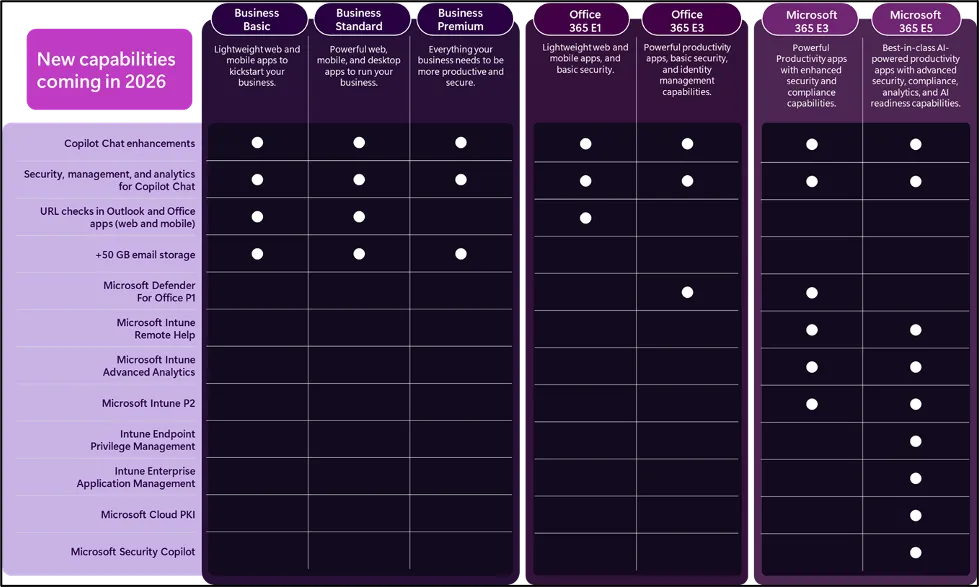
Figure 1: New M365 capabilities in 2026, including Intune Remote Help, Advanced Analytics, Plan 2, Privilege Management, and Cloud PKI.
Why These Intune Changes Matter for Security and Operations
On paper, these changes look incremental. In practice, they create real risk and opportunity.
Risk of App Outages and User Friction
If your mobile fleet relies on older Intune SDK versions or wrapped apps, users can hit a hard stop when the new enforcement kicks in. Outlook and Teams refusing to launch are helpdesk events, not minor glitches.
Without a plan, you will see the following happen:
- Support tickets spiking as users lose access to core productivity apps
- Shadow IT workarounds as users switch to unmanaged clients or personal devices
- Policy gaps where corporate data flows through apps that no longer respect MAM rules
Security Posture and AI Governance
The new Intune features bundled into M365 E3 and E5 are not cosmetic. Remote Help, Advanced Analytics, Plan 2, Endpoint Privilege Management, Enterprise Application Management, and Cloud PKI directly influence how you control endpoints, admin rights, and machine identities in an AI-heavy environment.
Used well, they can do the following:
- Tighten least-privilege access on clients without breaking operations.
- Provide richer telemetry on device health, policy drift, and risky behavior.
- Enforce issuance and management of certificates through Microsoft Cloud PKI for stronger machine trust.
Microsoft’s own messaging underscores this “integrated endpoint management” focus, not just licensing realignment.
Architecture Questions CIOs and CISOs Should Answer Now
These updates force a set of decisions that go beyond which SKU to buy.
-
What is the target system of record for endpoint management?
If you run parallel tools, such as Intune plus another Enterprise Mobility Management (EMM) or legacy imaging stack, you need a clear North Star. The more Intune becomes the anchor for policy and identity-aware access, the harder it is to justify a fragmented approach. -
How will you standardize MAM and app protection across fleets?
You need a plan to rebuild or rewrap internal apps with current Intune SDKs, validate conditional access (CA) behavior, and refine offline grace periods and Mobile Threat Defense (MTD) integrations. -
Where do new Intune capabilities sit in your security architecture?
Remote Help, Advanced Analytics, Plan 2, privilege management, and Cloud PKI should be mapped into your endpoint, identity, and key-management reference architectures, with clear ownership and runbooks. -
How will you explain the business case internally?
Pricing adjustments for M365 E3 and E5 arrive alongside these feature additions. Finance leaders will ask what they are getting in return. The answer needs to connect to reduced incident risk, lower tool sprawl, and stronger audit outcomes, not just “Microsoft raised prices again.”
The architects at Alchemy Technology Group, LLC (“Alchemy”), have guided Intune-centric endpoint designs for organizations with tens of thousands of devices across regulated industries. That experience matters when these decisions affect security, operations, and finance simultaneously.
A 6- to 12-Month Intune Action Plan for IT Leaders
To turn these changes into an advantage rather than a fire drill, we recommend a phased plan that aligns with Alchemy’s client guidance.
Assessment (0–90 days)
- Inventory all apps subject to Intune MAM, including LOB and third-party mobile apps.
- Identify SDK and wrapper versions, then prioritize high-usage or high-risk apps to rebuild or update.
- Validate CA, offline grace periods, and vendor MTD integrations to understand which users will feel the impact first.
Design (90–180 days)
- Define your target endpoint architecture with Intune at the center, including Remote Help, Advanced Analytics, and Plan 2 where they add clear value.
- Map current M365 SKUs to future plans and confirm when new capabilities will light up in your tenants.
- Rationalize overlapping tools and support contracts around remote support, analytics, and privilege management.
Execution (180–365 days)
- Build standard operating procedures (SOPs) for Remote Help sessions, analytics investigations, and privilege management approvals.
- Integrate Cloud PKI into your certificate and machine identity strategy if you are on M365 E5.
- Establish joint metrics between security and endpoint teams: app launch failures, privileged session volume, time to resolve device incidents, and audit findings tied to device and app controls.
Why This Matters Now for Your Next Renewal and Audit
- Prevent app outages that surface during or soon after M365 renewals.
- Show auditors clear control over mobile access, privileged actions, and machine identities.
- Present finance with a plan that trades overlapping tools for built-in Intune capabilities instead of a pure cost increase.
This article is part of Alchemy’s M365 series, designed to help IT leaders connect Microsoft announcements to practical architecture decisions.
Conclusion: Treat Intune as a Control Plane, Not a Checkbox
The 2026 Intune updates will expose the fragility of mobile app strategies and the fragmentation of endpoint tooling. At the same time, they give M365 E3 and E5 customers a richer set of controls for remote support, analytics, privilege management, and machine identity.
IT leaders who treat these as tactical license changes will spend the year firefighting outages and budget tension. Those who treat Intune as a strategic control plane will use this moment to simplify their endpoint stack, strengthen policy enforcement, and align Microsoft investments with a deliberate architecture.
Now is the time to decide which side of that line your organization will operate on.
Align Intune with an M365 Health Check
A focused M365 health check provides an objective view of how Intune, security policies, and collaboration services are configured today, where risks and waste exist, and which changes will have the greatest impact on stability and user experience. Alchemy’s architects review your environment, highlight specific configuration gaps, and provide a practical road map that connects Intune decisions to licensing, operations, and security outcomes.
Author
 Doug Lind